 Strainovic IT
 QR-bill for HubSpot: the Swiss QR code in the invoice PDF
The QR code is in HubSpot’s own PDF. As soon as an invoice in CHF is opened in HubSpot, a real Swiss QR code appears 2 to 3 seconds later in the PDF that HubSpot itself generates and emails, along with a link to the standard-compliant payment part with receipt. Payments from your bank’s camt.054 file set the invoice to paid in HubSpot.
The problem
HubSpot generates and emails its invoices itself, but without a Swiss QR code, and the invoice template cannot be changed. Anyone invoicing in CHF therefore sends customers an invoice with no code: IBAN and amount get retyped, the payment arrives without a reference, and whoever wants to know whether it has been paid checks the e-banking and records it in HubSpot by hand.
What it does
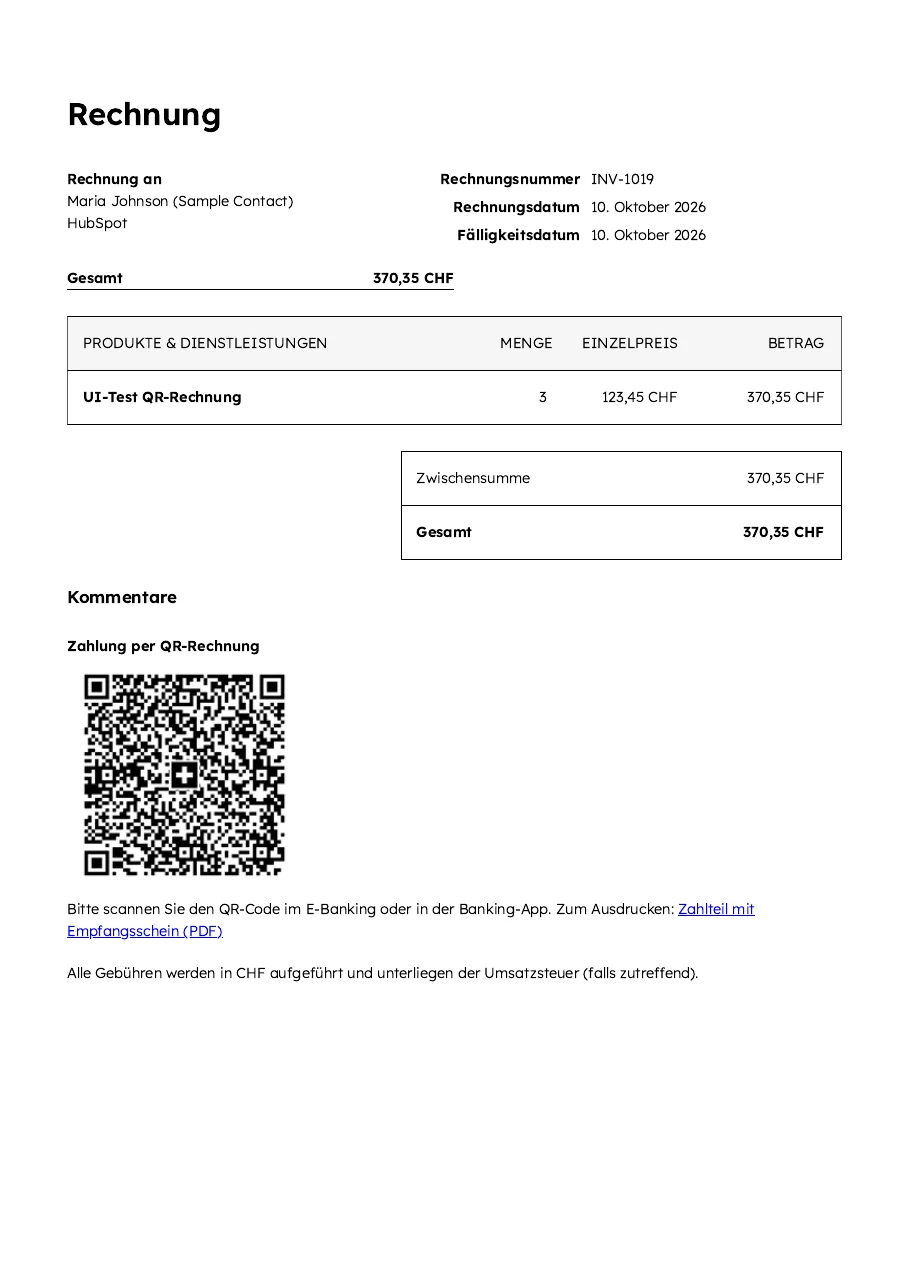
- Places a real Swiss QR code (Swiss QR Bill) into every invoice in CHF that is opened in HubSpot, with creditor, IBAN, amount, reference and the message “Invoice INV-…”; it appears in the PDF that HubSpot generates and emails, and on the invoice page in HubSpot
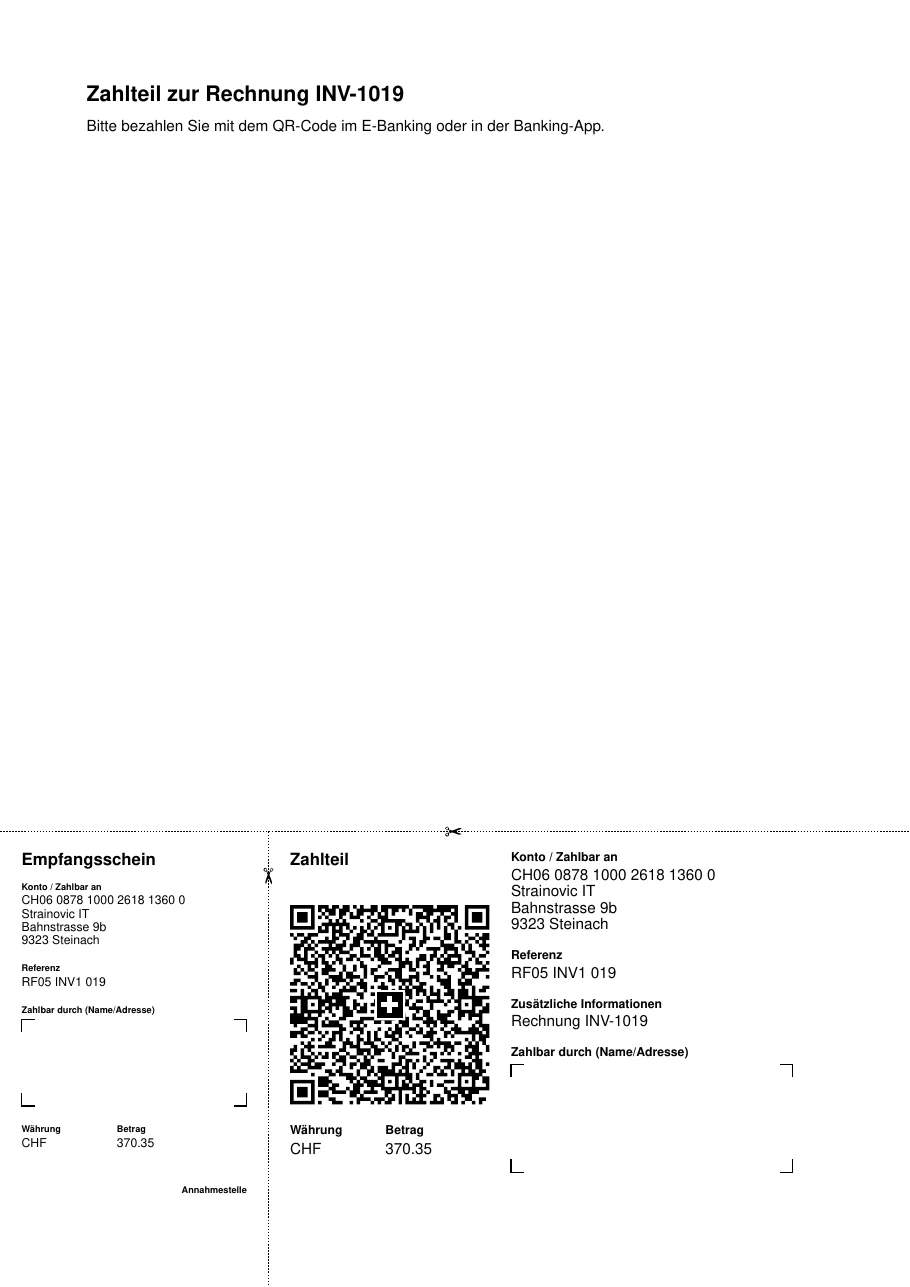
- Adds the link «Payment part with receipt (PDF)»: an A4 page with payment part and receipt at the bottom, as the banks prescribe, for anyone who wants the payment part on paper
- With a QR-IBAN a QR reference, with an ordinary IBAN a Creditor Reference (SCOR) derived from the invoice number
- The debtor is the company associated with the invoice, with its address, otherwise the contact
- Texts in the QR block and on the payment part in German, French, Italian or English, according to the language of the invoice
- If the amount of an open invoice changes, the QR code is replaced
- Recurring invoices from HubSpot subscriptions get the QR code too, before HubSpot emails them
- Runs without workflows, even in HubSpot’s free portal: HubSpot notifies the service of every change to an invoice
- Payment matching: you upload your bank’s camt.054 file on the setup page. For every payment of the full outstanding amount the service creates a payment in HubSpot, and the invoice is then paid. Partial payments, differing amounts, invoices already paid and unknown references are shown for review, none of them is recorded; the same bank entry is never recorded twice
- Invoices in CHF only
One limit: HubSpot does not allow the invoice template to be changed. The QR code therefore sits under «Comments», after the totals, not as a payment part at the bottom of the invoice; the standard-compliant payment part comes via the link.
What it looks like
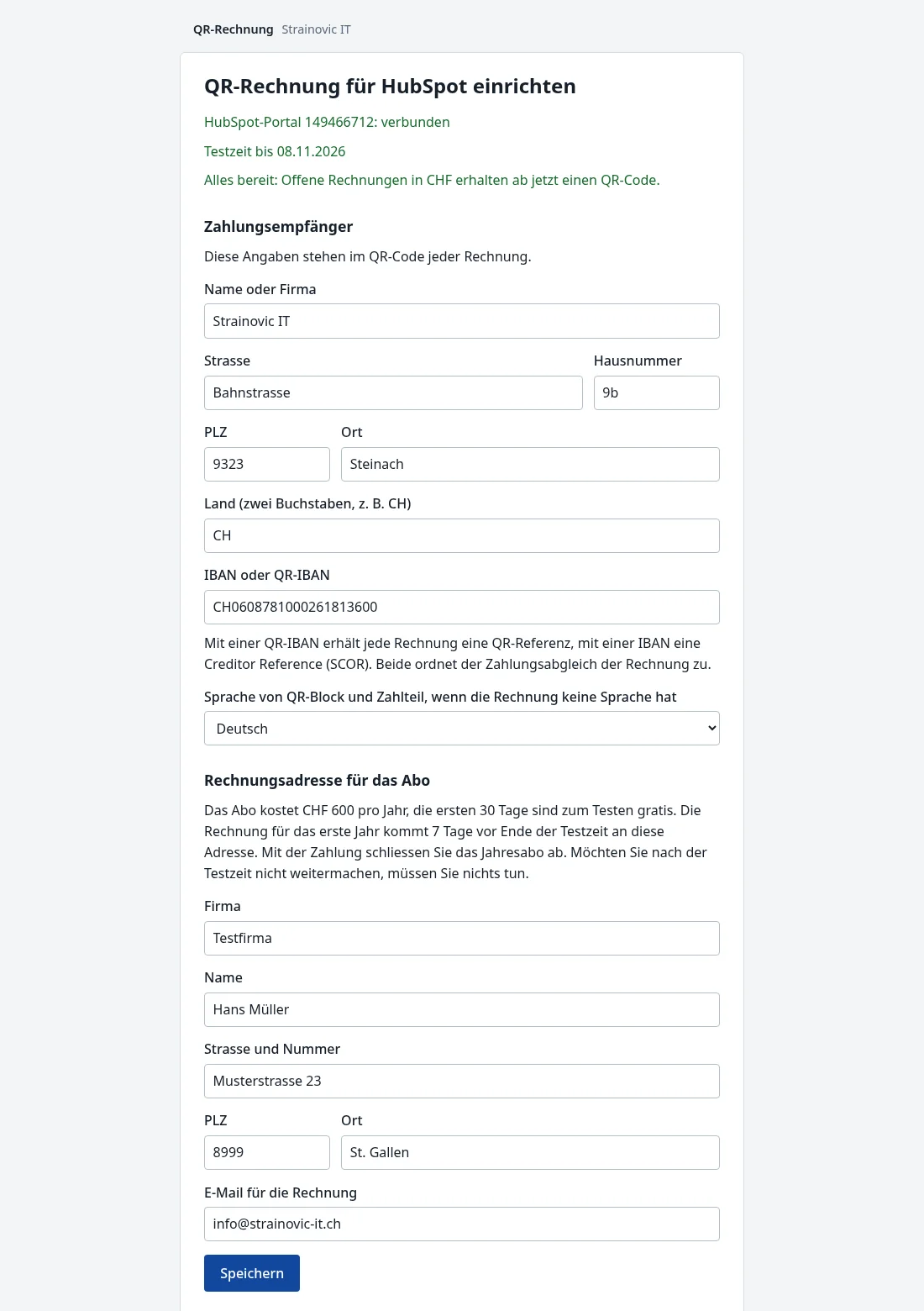
The screenshots show HubSpot and the setup page in German.
Setup
No programming, nothing to install on your computers or servers:
- Install the app in HubSpot
- On the setup page, enter creditor, IBAN or QR-IBAN, language, billing address and email for the subscription, then save
- From then on, open invoices in CHF get the QR code
The page checks the IBAN and shows a sample QR code. The service runs on an Infomaniak server in Switzerland; the QR image and the payment part are stored in the file manager of your own HubSpot portal. What is stored and when it is deleted is set out in the privacy policy.
Price
- Free for 30 days, no commitment, with your real invoices
- Then CHF 600 per year per HubSpot portal, without VAT (Strainovic IT is not subject to VAT). It only becomes binding once you pay; without payment the QR codes stop and no costs arise. The paid year runs to its end, no refund; nothing renews by itself, the next annual invoice is an offer. The invoices to your customers never carry any note about the subscription
Try it
- Install the app in HubSpot; this needs admin rights. The app has not yet been reviewed by HubSpot, so HubSpot shows a warning, which you confirm by typing it in. The 30-day trial starts with the installation.
- On the setup page, enter creditor, IBAN or QR-IBAN, language, billing address and email for the subscription, then save. The page checks the IBAN and shows a sample QR code.
- From then on, open invoices in CHF get the QR code. The annual invoice comes by email 7 days before the trial ends, payable within 30 days, and the QR codes continue until then; without payment no costs arise.
Prefer to ask questions first? Write to me.
Strainovic IT, Steinach SG, developing for Swiss SMEs and agencies since 2016.