Website enquiries straight into bexio

No more retyping. Every enquiry from your Contact Form 7 form lands in bexio as a contact, with the form text as a note. You reply from within bexio, with all the data, no copy and paste.
Flow: an enquiry from the website form becomes a contact in bexio, with the form text as a noteWebsite formContact or quotationenquiry sentbexio form connectorRecognises an existingcontact by emailbexioContact with address,phone and form text asa noteFlow: an enquiry from the website form becomes a contact in bexio, with the form text as a noteWebsite formContact or quotation enquiry sentbexio form connectorRecognises an existing contact by emailbexioContact with address, phone and formtext as a note

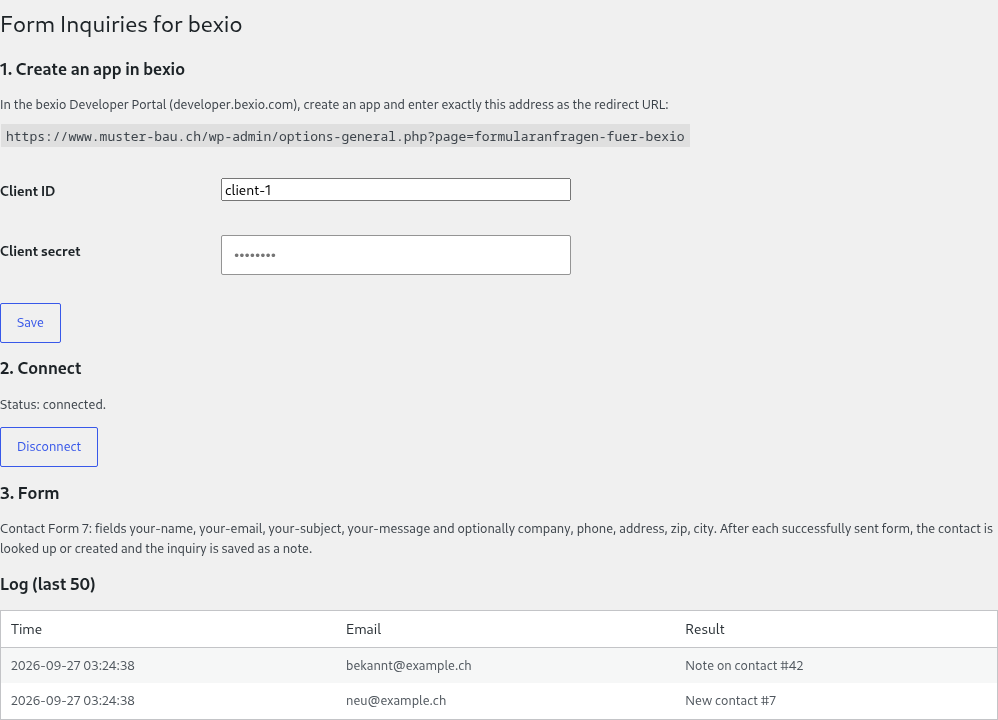
Settings page in the WordPress admin: connection to bexio established, log with a new contact and a note on an existing contact

What it does

  • Works with Contact Form 7
  • Creates company and contact person as a bexio contact, with address, email, phone and the form text as a note
  • Recognises existing contacts by their email address, no duplicates
  • Log in the WordPress admin: what was transferred and when, with the error message if bexio could not be reached

On request

I set up other form plugins and the Pro features on request:

  • WPForms, Gravity Forms and Elementor Forms
  • Pro (on request): a quote or an order from the form fields, assignment to an employee, a follow-up task
Before and after: what the bexio form connector changesSo farRetype the enquiry in bexio by handWith the connectorThe enquiry arrives in bexio as acontactSo farCopy and paste the dataWith the connectorReply from bexio, with all the dataBefore and after: what the bexio form connector changesSo farRetype the enquiry in bexio by handWith the connectorThe enquiry arrives in bexio as acontactSo farCopy and paste the dataWith the connectorReply from bexio, with all the data

Who it is for

Trades businesses, consultancies, agencies and service providers in Switzerland who use bexio and receive enquiries or requests for quotation on their website. Worth it from five enquiries a week.

Price

  • Basic: CHF 228 per year, the Contact Form 7 enquiry becomes a bexio contact
  • Pro: CHF 348 per year, on request, plus a quote or order, assignment and a follow-up task
  • Help with setup included
  • Free for 30 days, no commitment. It only becomes binding once you pay; without payment the transfer stops and no costs arise. The paid year runs to its end, no refund; nothing renews by itself, the next annual invoice is an offer
  • Fiduciaries and agencies who refer a client receive 20% of every payment the client makes, for as long as they pay

Try it

Download, free for 30 daysThe terms of use apply to the download.

  1. Upload the ZIP under Plugins → Add New Plugin → Upload Plugin and activate it. It is the only plugin you need, no base plugin from wordpress.org.
  2. Contact Form 7 must be installed and active, otherwise WordPress does not activate the plugin.
  3. Under Settings → Form Inquiries for bexio, click “Connect to bexio”. The 30-day trial starts then.
  4. Then confirm your billing address, prefilled from your bexio company profile. The annual invoice comes by email 7 days before the trial ends, payable within 30 days, and the transfer continues until then; without payment no costs arise.

Questions? info@strainovic-it.ch

Together with the free UID check: business enquiries with a checked UID, company name and address come from the federal UID register.

Strainovic IT, Steinach SG, developing for Swiss SMEs and agencies since 2016.